
FAQ – REMOTE APP – LISTS
Home | Frequently Asked Questions | Remote App | Personal Lists
Personal lists
- "Player " refers to a PC, laptop, or tablet on which BCM Stream Easy or Pro is installed.
What is the difference between personal lists and custom lists?
In short, “personal playlists” are stored on your smartphone, and “my playlists” are stored in the player. As soon as you send a personal playlist to a player, it is added to “my playlists” (in a folder named after your smartphone, e.g., “Piet’s iPhone”).
From that point on, this list will also be available on your smartphone under “Load program lists” > “My lists”.
** You can send a personal playlist to multiple players **
Where are a user's playlists located in the player?
When you send “personal playlists” to a player via the Remote app, they will appear in the player’s “My Playlists” section. A folder named after your smartphone (e.g., Piet’s iPhone) is automatically created. In this folder, you can find all your personal playlists and use them in the player.
Please note: if you send a personal playlist to a player that already contains it, the playlist in the player will be overwritten.
How can you send the "My Favorites" list from your smartphone to the player?
If you want to send the “My Favorites” list (found under the menu item “Playlists” > “My Personal Lists”) from your smartphone to the player, you must first turn it into a “personal playlist.”
Click on the list “My Favorites” to open it.  Next, tap the menu icon in the upper-right corner with the arrow underneath it. A pop-up will appear, allowing you to copy the personal list. Give the new personal list a name and tap “OK”.
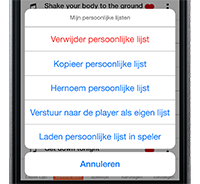 The playlist is now ready to be sent to the player. Tap the new playlist to open it. Then tap the menu icon in the top-right corner with the arrow underneath it. A pop-up will appear with options including “Send to the player as a custom playlist”.
After you tap it, a folder will automatically be created (in the player under "My Lists") with the name of your smartphone (e.g., "Piet's iPhone"). This folder will contain the personal playlists you've sent to the player.
How can you add a song that's currently playing to a playlist?
 If you want to add the song currently playing in the player to a personal playlist, tap the heart icon in the playlist. The song will then be added to your favorites (in “My Favorites”)
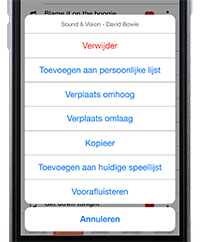 Next, go to “Playlists” in the menu and select the “My Favorites” folder to open it. Then tap the three vertical dots to the right of the song you want to add to a personal playlist. A pop-up will appear with options including “Add to personal list”.
How can you change the order of songs in a playlist?
Tap the personal list you want to edit to open it. Then tap the three vertical dots to the right of the number you want to move. A pop-up will appear with options including “Move up” and “Scroll down”.
** If you move songs in a personal playlist on your smartphone, they will not be moved to the same playlist in the player **
How do you delete a personal list from your smartphone?
Tap the personal list you want to delete to open it. Then tap the menu icon in the upper-right corner with the arrow underneath it.
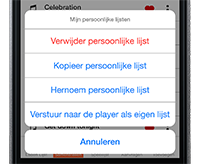 A pop-up appears with options including “Delete personal list“.
** If you delete a personal playlist on your smartphone, the same playlist will not be deleted from the player **
Do you have a question?
Start your search here:

