
SEARCH LIST
Home | Manuals | BCM Stream Pro | Search list
Pro - Search list
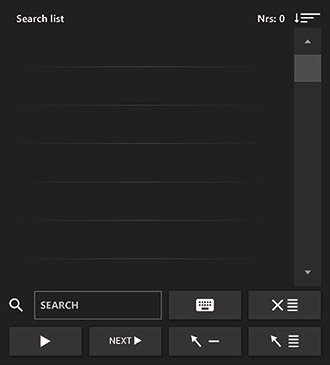
Explanation buttons:
 |
Turn on the keyboard. |
 |
Empty search list. |
 |
Play the selected track immediately (without a fade-in). |
 |
Set the selected song as the next song to play in the player. |
 |
Adding the selected song to the playlist |
 |
Add the complete search list to the playlist. |
 |
Select here how you want to sort the search results: by title, artist, rating, original order, or BPM. |
To search for a song, click on the search field. The keyboard will appear. Type the name of the artist or the title of the song you're looking for.
As soon as you enter two letters or numbers, the system automatically searches for all numbers that contain that combination. The search results appear in the search list. You can view the contents of the search list by using the scroll bar.
Do you have a question?
Start your search here:

