
SETTINGS
Home | Manuals | BCM Stream Pro | Settings
Pro - Menu settings - Settings
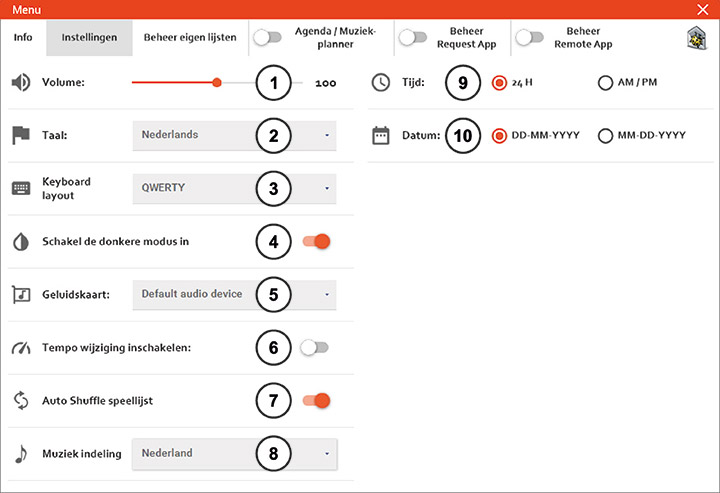
In Settings, the following can be set:
- Volume: The default setting is 100%. Depending on the sound card used, it may be desirable to increase the volume above 100%. Increasing the volume above 100% may cause sound distortion.
- Language: Here you set the desired language.
- Keyboard layout: Here you can set your preferred keyboard layout.
- Mode: Here you can choose the appearance of the player. Light or dark.
- Sound Card: Select the sound output you want to use here.
- Speed: If you turn this on, you can play songs faster or slower.
- Auto Shuffle: When this is enabled, the songs are shuffled automatically when a list is loaded.
- Music Category: Here, you select the music programming for a specific country. For example, the “Dutch Top 40” chart is only available if you set the music category to “Netherlands.”
- Time: Here you can select the desired time format.
- Date: Here, you select the desired date format.
Do you have a question?
Start your search here:

