
PROGRAM LIST
Home | Manuals | BCM Stream Pro | Program List
Pro - Categories
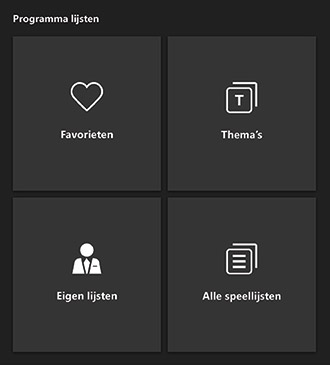
Explanation buttons:
 |
All lists set as favourite. |
 |
All lists compiled for a theme such as Brown Café, Dinner Restaurant, Hit Lists, Holidays, etc. |
 |
All the custom lists you've saved. |
 |
All available genre lists. |
When you click on a list, it is immediately added to the playlist.
If you want to play multiple playlists at the same time, select the next playlist you want to listen to and tap “Add” on the pop-up screen.
TIP 1: When you drag a list—or your own list—onto the search list, the contents of that list appear in alphabetical order. This lets you quickly see which songs are in a list.
TIP 2: To delete a song from your own list, load your own list into an empty playlist. Select the song you want to delete. Press the  button. You will then be asked whether you want to remove the song from the playlist or from the system. Press the “Remove from Playlist” button. After that, you’ll need to save the list again. Press the
  button. You will then be asked whether you want to replace the contents of an existing custom list or create a new custom list. Click the “Replace” button and select the appropriate list.
Do you have a question?
Start your search here:

