
MANAGE BACKUPS
Home | Manuals | BCM Stream Pro | Manage Backups
Pro – Remote App Management – Manage Backups
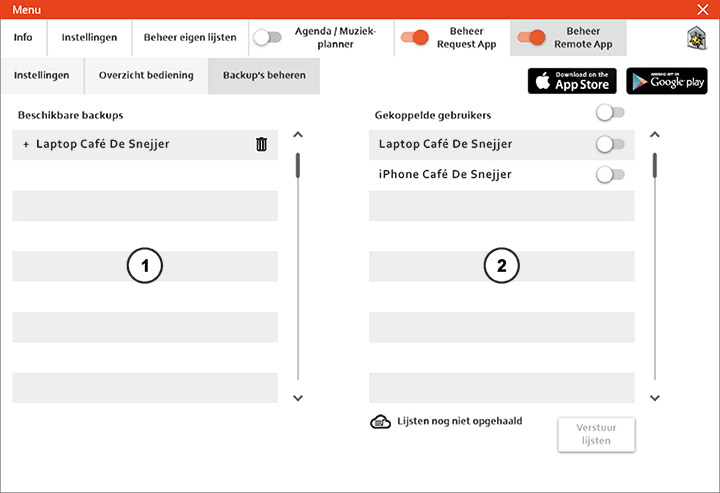
- This is where all the backups created for each user are listed.
- All linked users are listed here.
If you select a user from the list of backups, the list will expand and all of that user's backups will be displayed.
Would you like to send a backup to a linked user? Select the backup from the list (1), toggle the switch next to the user you want to send it to (2), and click “Send Lists.”
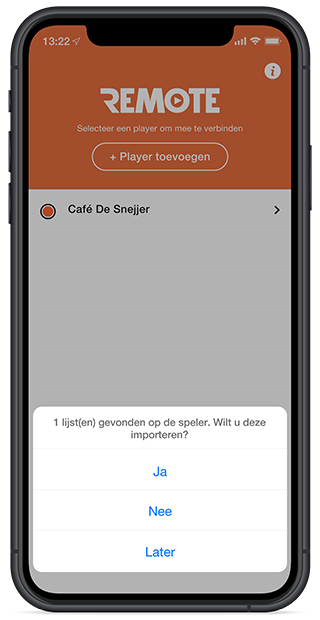 A cloud icon now appears next to the linked user. This indicates that the user has not yet retrieved the list. As soon as the user opens the Remote App, they will see this notification asking if they want to import it. They can then choose from: Yes, No, or Later.
This can be helpful if you accidentally deleted a personal list. Or if you've bought a new smartphone and want to transfer your personal lists to it.
Do you have a question?
Start your search here:

